Light Indicators#
Indicators on the Crazyflie#
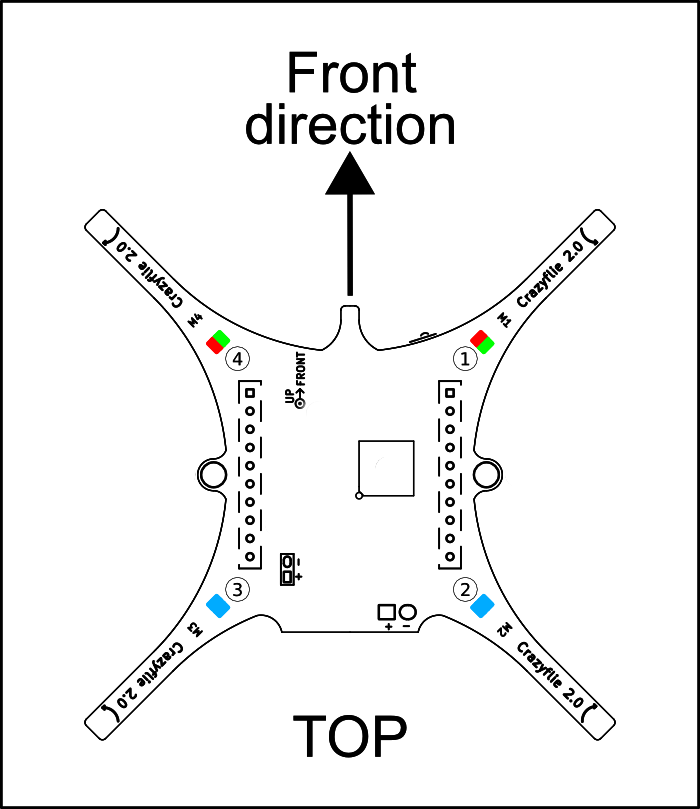
Both blue lights should be on if the drone is running correctly
If both the red light is on and the green light has turned orange, the drone has experienced an error
The red light will flash faster the lower the battery on the drone is
The red light will stay steadily on if the drone has low battery
The green light will flash if the drone is receiving commands
The green light will turn slightly orange if it is sending information
If both blue lights are flashing, the drone is in “flash firmware” mode
If the red light (1) is repeatedly blinking five short red pulses with a longer pause between groups, then self test fails. It could be because of an assert fail(runtime error, i.e. divided by 0), which would be printed in the console. Restart the Crazyflie if that is the case (and debug).
Note: If one Crazyflie does not connect for no apparent reason, then restart it. It may be stuck in an internal loop.
Indicators on the Crazyradio#
If the green light is on, then the radio is transmitting and receiving data correctly
If the red light is on, then the radio is transmitting data but is not receiving anything
It is expected for both of the lights to be on and flickering while the robot is flying